Pages
In this chapter, you will learn how to declare static pages.
Default pages
In Odoo, websites come with a few default static pages (Home, Contact us, 404, …). They are built the following way.
/website/data/website_data.xml¶<template id="website.homepage" name="Home">
<t t-call="website.layout">
<t t-set="pageName" t-value="'homepage'"/>
<div id="wrap" class="oe_structure oe_empty" />
</t>
</template>
Each default page is a template with its own content saved into a record. This is the reason why, custom pages are created within a record.
The <t-call='website.layout'> has some variables that can be set:
Define the meta title.
<t t-set="additional_title">My Page Title</t>
Javaslat
The t-set here does not pass the value into a t-value or a t-valuef attribute.
This is for translation purpose. The content of a t-value or a t-valuef is not explicitly
exported for translation. Beside that, as it’s written in XML, a string located between an opening
and a closing tag is considered translatable by default.
Example
Good example:
<t t-set="additional_title">My title</t>
Bad example:
<t t-set="additional_title" t-valuef="My title"/>
Define the meta description.
<t t-set="meta_description">This is the description of the page that will appear on Search
Engines.</t>
Add a CSS class to the page.
<t t-set="pageName" t-valuef="..."/>
Hide the header.
<t t-set="no_header" t-value="true"/>
Hide the footer.
<t t-set="no_footer" t-value="true"/>
If needed, deactivate default pages.
/website_airproof/data/pages/home.xml¶<record id="website.homepage" model="ir.ui.view">
<field name="active" eval="False"/>
</record>
/website_airproof/data/pages/contactus.xml¶<record id="website.contactus" model="ir.ui.view">
<field name="active" eval="False"/>
</record>
Alternatively, replace the default content of these pages using XPath.
/website_airproof/data/pages/404.xml¶<template id="404" inherit_id="http_routing.404">
<xpath expr="//*[@id='wrap']" position="replace">
<t t-set="additional_title" t-value="'404 - Not found'"/>
<div id="wrap" class="oe_structure">
<!-- Content -->
</div>
</xpath>
</template>
Lásd még
Theme pages
You can add as many pages as you want to your website. Instead of defining a <template>, create a
page object.
Declaration
/website_airproof/data/pages/about_us.xml¶<?xml version="1.0" encoding="utf-8"?>
<odoo noupdate="1">
<record id="page_about_us" model="website.page">
<field name="name">About us</field>
<field name="is_published" eval="True"/>
<field name="key">website_airproof.page_about_us</field>
<field name="url">/about-us</field>
<field name="website_id" eval="1" />
<field name="type">qweb</field>
<field name="arch" type="xml">
<t t-name="website_airproof.page_about_us">
<t t-call="website.layout">
<div id="wrap" class="oe_structure">
<!-- Content -->
</div>
</t>
</t>
</field>
</record>
</odoo>
Multiwebsite and website_id
In a module context, the record created above is available, by default, on every website
available on the database. It’s preferable to specify the website_id of the website where the
page will be findable.
Field |
Description |
|---|---|
name |
Page name (human-readable). |
is_published |
Define if the page is published (visible to visitors). |
key |
View key (must be unique) |
url |
Relative path where the page is reachable. |
type |
View type |
arch |
View architecture (the markup of your page) |
With <t t-call="website.layout"> you use the Odoo default page layout with your code.
noupdate attribute
This attribute prevents data overwriting. It can be added either on a data tag wrapping some
records to protect or on the odoo`tag in order to protect all records declared into the file.
Protect all records of the file:
<?xml version="1.0" encoding="utf-8"?>
<odoo noupdate="1">
   <record id="menu_company" model="website.menu">
      <!-- Fields -->
   </record>
   <record id="menu_faq" model="website.menu">
      <!-- Fields -->
   </record>
</odoo>
Protect specific records in the file:
<?xml version="1.0" encoding="utf-8"?>
<odoo>
   <record id="menu_company" model="website.menu">
      <!-- Fields -->
   </record>

   <data noupdate="1">
      <record id="menu_faq" model="website.menu">
         <!-- Fields -->
      </record>
      <record id="menu_legal" model="website.menu">
         <!-- Fields -->
      </record>
   </data>
</odoo>
Use case
There are several static pages created in the module. This one has been installed on the database and the end-user has updated some of those pages. Some bug fixes must be applied on the static pages while avoiding any loss of changes made by the end-user.
Problem
In case of a module update on the database, every record declared into the module will overwrite those existing in the database even if the end-user has changed some of these records.
Solution
By wrapping the record (or all records declared in the file) into a <data noupdate="1"></data>
tag, the record declared is created at the first module installation but not updated after a module
update.
The system detects that this record doesn’t exist and will re-create it.
Of course not. It’s technically usable for every type of records.
Header overlay
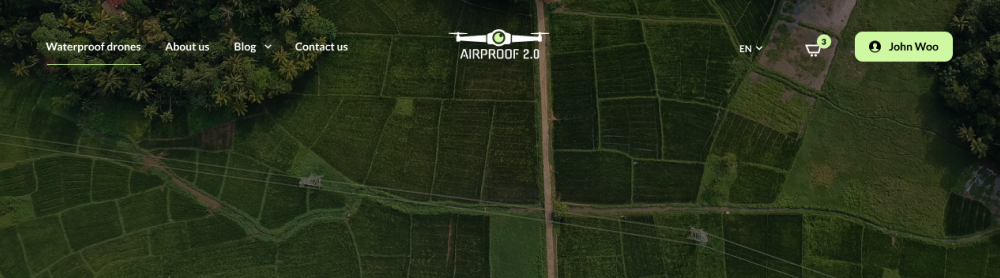
Make the header background transparent and stand on top of the page content.
<field name="header_overlay" eval="True"/>
Megjegyzés
To create the content of a static page, use the Odoo way of doing things in order to remain editable by the Website Builder. Please note that Odoo takes advantage of Bootstrap framework (5.1.3).
Find the available classes and components:
Page templates
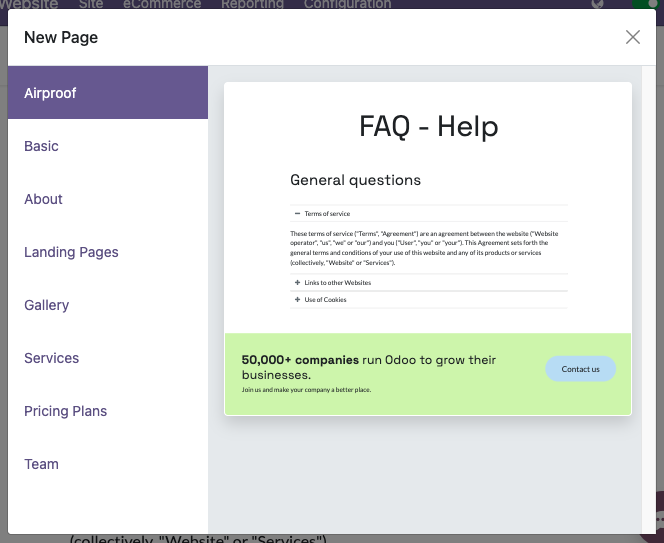
Create preset static page templates available from the New Page dialog window.
Declaration
The page templates has to be defined into the __manifest__.py of the module through
new_page_templates and new_page_template_templates.xml:
/website_airproof/__manifest__.py¶{
'name': 'Airproof Theme',
'description': '...',
'category': 'Website/Theme',
'version': '18.0.0.0',
'author': '...',
'license': '...',
'depends': ['website'],
'data': [
# ...
'views/new_page_template_templates.xml'
],
'assets': {
# ...
},
'new_page_templates': {
'airproof': {
'faq': ['s_airproof_text_block_h1', 's_title', 's_faq_collapse', 's_call_to_action']
}
}
Templates
Then you have to create the template using a specific naming convention based on the hierarchy into
the __manifest__.py. In this case, the name is new_page_template_sections_airproof_faq.
The building blocks called in this template are exactly the same as the standard ones except for
the first that has been adapted „on the fly”.
Create a new instance of the standard s_text_block (primary attribute is important) and apply some
adaptations:
/website_airproof/views/new_page_template_templates.xml¶<template id="s_airproof_text_block_h1" inherit_id="website.s_text_block" primary="True">
<xpath expr="//div[hasclass('container')]|//div[hasclass('o_container_small')]" position="replace">
<div class="container s_allow_columns">
<h1 class="display-1">FAQ - Help</h1>
</div>
</xpath>
</template>
Instantiate each building block (modified or not) for the page template:
/website_airproof/views/new_page_template_templates.xml¶<template id="new_page_template_airproof_faq_s_text_block_h1" inherit_id="website_airproof.s_airproof_text_block_h1" primary="True"/>
<template id="new_page_template_airproof_faq_s_title" inherit_id="website.s_title" primary="True"/>
<template id="new_page_template_airproof_faq_s_faq_collapse" inherit_id="website.s_faq_collapse" primary="True"/>
<template id="new_page_template_airproof_faq_s_call_to_action" inherit_id="website.s_call_to_action" primary="True"/>
Then, create your page template with some t-snippet-call within an #wrap as explained above:
/website_airproof/views/new_page_template_templates.xml¶<template id="new_page_template_sections_airproof_faq" name="Airproof - New Page Template FAQ">
<div id="wrap">
<t t-snippet-call="website_airproof.new_page_template_airproof_faq_s_text_block_h1"/>
<t t-snippet-call="website_airproof.new_page_template_airproof_faq_s_title"/>
<t t-snippet-call="website_airproof.new_page_template_airproof_faq_s_faq_collapse"/>
<t t-snippet-call="website_airproof.new_page_template_airproof_faq_s_call_to_action"/>
</div>
</template>
Once the page template is created, create a custom group and add it to the existing ones. Find below a list of the existing groups:
/website/views/new_page_template_templates.xml¶<template id="new_page_template_groups">
<div id="basic">Basic</div>
<div id="about">About</div>
<div id="landing">Landing Pages</div>
<div id="gallery">Gallery</div>
<div id="services">Services</div>
<div id="pricing">Pricing Plans</div>
<div id="team">Team</div>
</template>
Feel free to add custom groups to the list:
/website_airproof/views/new_page_template_templates.xml¶<template id="new_page_template_groups" inherit_id="website.new_page_template_groups" name="Airproof - New Page Template Groups">
<xpath expr="//div[@id='custom']" position="after">
<div id="airproof">Airproof</div>
</xpath>
</template>