
RST guidelines and cheat sheet
Fontos
We strongly recommend reading the Content guidelines and main Documentation pages before contributing.
General guidelines
Follow the RST guidelines below when contributing to the documentation to help maintain consistency with the rest of the documentation and facilitate the review process for the team:
Formatting
Use specific formatting to improve clarity and readability. For example, apply Menu selection for menu paths, GUI element for other user interface elements, such as fields, buttons, and options, Note for notes, Example for examples, etc.
Megjegyzés
Add a blank line between different block elements, such as paragraphs, lists, and directives to ensure proper rendering and formatting.
Indentation
Use only spaces (never tabs).
Use as many spaces at the beginning of an indented line as needed to align it with the first character of the markup in the line above. This usually implies three spaces, but you only need two for bulleted lists, for example.
Example
The first : is below the i (three spaces):
.. image:: media/example.png
   :alt: example
The :titlesonly: and page references start below the t (three spaces):
.. toctree::
   :titlesonly:

   payables/supplier_bills
   payables/pay
Continuation lines resume below the I’s of „Invoice” (two spaces):
- Invoice on ordered quantity: invoice the full order as soon as the sales order is confirmed.
- Invoice on delivered quantity: invoice on what was delivered even if it is a partial
  delivery.
100th-character limit
In RST, it is possible to break a line without forcing a line break on the rendered HTML. Make use of this feature to write lines of maximum 100 characters. It is not necessary to leave a trailing whitespace at the end of a line to separate words.
Javaslat
You can safely break a line on any space, even inside markups such as
menuselectionanddoc.Some external hyperlinks may exceed 100 characters, but leaving them on a single line is acceptable.
Example
To register your seller account in Odoo, go to :menuselection:`Sales --> Configuration -->
Settings --> Amazon Connector --> Amazon Accounts` and click :guilabel:`Create`. You can find
the **Seller ID** under the link :guilabel:`Your Merchant Token`.
Headings
For each formatting line (e.g., ===), write as many symbols (=) as there are characters in the
header. Use the symbols below to format headings:
Heading size |
Formatting |
|---|---|
H1 |
=======
Heading
=======
|
H2 |
Heading
=======
|
H3 |
Heading
-------
|
H4 |
Heading
~~~~~~~
|
H5 |
Heading
*******
|
H6 |
Heading
^^^^^^^
|
Fontos
Each document must have exactly one H1 heading.
Markups
Emphasis (italic)
To emphasize a part of the text. The text is rendered in italic.
Fill out the information before saving the form. |
Fill out the information *before* saving the form.
|
Strong emphasis (bold)
To emphasize a part of the text. The text is rendered in bold.
A subdomain is a domain that is a part of another domain. |
A **subdomain** is a domain that is a part of another domain.
|
Technical term (literal)
To write a technical term or a specific value to insert. The text is rendered in literal.
Insert the IP address of your printer, for example, |
Insert the IP address of your printer, for example, `192.168.1.25`.
|
Definitions
Use the dfn markup to define a term.
The documentation is written in RST and needs to be built (converted to HTML) to display nicely. |
The documentation is written in RST and needs to be built (:dfn:`converted to HTML`) to
display nicely.
|
Abbreviations
Use the abbr markup to write a self-defining abbreviation that is displayed as a tooltip.
Odoo uses OCR and artificial intelligence technologies to recognize the content of the documents. |
Odoo uses :abbr:`OCR (optical character recognition)` and artificial intelligence
technologies to recognize the content of the documents.
|
GUI element
Use the guilabel markup to identify any text of the interactive user interface (e.g., labels).
Update your credentials, then click on Save. |
Update your credentials, then click on :guilabel:`Save`.
|
Megjegyzés
Avoid using the guilabel markup when referring to a concept or general term.
Example
- Good example:To create a credit note, go to , open the invoice, and click Credit Note.
- Bad example:To create a Credit Note, go to , open the Invoice, and click Credit Note.
Menu selection
Use the menuselection markup to guide users through a sequence of menus, starting with the app’s
name.
To review sales performance, go to . |
To review sales performance, go to :menuselection:`Sales --> Reporting --> Dashboard`.
|
Megjegyzés
Only include actual menu items in the menuselection markup:
Use the GUI element markup for other user interface elements, such as buttons and section titles:
To configure the bill control policy, navigate to :menuselection:`Purchase --> Configuration
--> Settings`, and scroll down to the :guilabel:`Invoicing` section. Under :guilabel:`Bill
Control`, select either :guilabel:`Ordered quantities` or :guilabel:`Received quantities`.
Do not include menu section names. For example, in the screenshot below,
Journalsshould not be included in the menu path :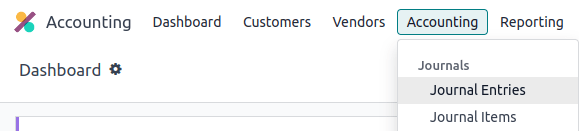
File
Use the file markup to indicate a file path or name.
Create redirections using the |
Create redirections using the :file:`redirects.txt` file found at the root of the
repository.
|
Command
Use the command markup to highlight a command.
Run the command make clean html to delete existing built files and build the documentation to HTML. |
Run the command :command:`make clean html` to delete existing built files and build the
documentation to HTML.
|
Icons
Use the icon markup to add the class name of an icon. There are three icon sets used in Odoo:
FontAwesome4 (fa-*), Odoo UI
(oi-*) and Odoo Spreadsheet (os-*) icons.
Follow the icon with its name as a GUI element in brackets as a descriptor.
The graph view is represented by the (area chart) icon. The pivot view is represented by the (pivot table) icon. Use (global filters) in Odoo Spreadsheet. |
The graph view is represented by the :icon:`fa-area-chart` :guilabel:`(area chart)` icon.

The pivot view is represented by the :icon:`oi-view-pivot` icon.

Use :icon:`os-global-filters` :guilabel:`(global filters)` in Odoo **Spreadsheet**.
|
Lists
Bulleted list
|
- This is a bulleted list.
- It has two items, the second
  item uses two lines.
|
Numbered list
|
#. This is a numbered list.
#. Numbering is automatic.
|
|
6. Use this format to start the numbering
   with a number other than one.
#. The numbering is automatic from there.
|
Javaslat
Prefer the use of autonumbered lists with #. instead of 1., 2., etc. for better code
resilience.
Nested lists
Javaslat
Add a blank line before the nested elements in lists.
Indent nested lists properly, with sub-items aligned under their parent item.
|
- This is the first item of a bulleted list.

  #. It has a nested numbered list
  #. with two items.
|
Hyperlinks
Megjegyzés
When using labels for hyperlinks, make sure they are clear and descriptive to indicate the destination or purpose of the link.
Example
External hyperlinks
External hyperlinks are links to a URL with a custom label. They follow the syntax:
`label <URL>`_.
Fontos
Use documentation page hyperlinks when targeting another documentation page.
For instance, this is an external hyperlink to Odoo’s website. |
For instance, `this is an external hyperlink to Odoo's website <https://www.odoo.com>`_.
|
Aliases
External hyperlink aliases allow creating shortcuts for external hyperlinks. The definition syntax
is as follows: .. _target: URL. There are two ways to reference them, depending on the use case:
target_creates a hyperlink with the target name as label and the URL as reference. Note that the_moved after the target.`label <target_>`_the label replaces the name of the target, and the target is replaced by the URL.
A proof-of-concept is a simplified version, a prototype of what is expected to agree on the main lines of expected changes. PoC is a common abbreviation. |
.. _proof-of-concept: https://en.wikipedia.org/wiki/Proof_of_concept

   A proof-of-concept_ is a simplified version, a prototype of what is expected to agree on
   the main lines of expected changes. `PoC <proof-of-concept_>`_ is a common abbreviation.
|
Internal documentation links
Fontos
When refactoring (improving without adding new content) section headings or hyperlink targets, make sure not to break any hyperlink reference to these targets, or update them accordingly.
Relative links
If you need to reference an internal documentation page or a file that is not located in the same directory as the current page, always use relative file paths instead of absolute file paths. This ensures that links remain valid even with version updates, folder name changes, and directory structure reorganizations.
An absolute file path indicates the target’s location from the root directory. A relative file path
uses smart notations (such as ../ that redirects to the parent folder) to indicate the target’s
location relative to that of the source document.
Example
Megjegyzés
The purpose of the following example is to illustrate the difference between absolute and relative links. Always use Documentation page hyperlinks when referencing documentation pages.
Given the following source file tree:
documentation
├── content
│   └── applications
│   │   └── sales
│   │   │   └── sales
│   │   │   │   └── products_prices
│   │   │   │   │   └── products
│   │   │   │   │   │   └── import.rst
│   │   │   │   │   │   └── variants.rst
│   │   │   │   │   └── prices.rst
A reference to prices.rst and variants.rst could be made from import.rst
as follows:
Absolute:
documentation/content/applications/sales/sales/products_prices/prices.rstdocumentation/content/applications/sales/sales/products_prices/products/variants.rst
Relative:
../prices.rstvariants.rst
Documentation page hyperlinks
The doc markup allows referencing a documentation page wherever it is in the file tree through a
relative file path. There are two ways to use the doc markup:
:doc:`path_to_doc_page`creates a hyperlink to the documentation page with the title of the page as label.:doc:`label <path_to_doc_page>`creates a hyperlink to the documentation page with the given label.
Please refer to the Accounting documentation to learn more about Vevői számlák. |
Please refer to the :doc:`Accounting documentation <../../../applications/finance/accounting>`
to learn more about :doc:`../../../applications/finance/accounting/customer_invoices`.
|
Fontos
Use relative links for documentation page hyperlinks.
Custom anchors
Custom anchors follow the same syntax as external hyperlink aliases but without any URL. They allow referencing a specific part of a RST file by using the target as an anchor. When users click the reference, they are taken to the part of the documentation page where the target is defined.
The definition syntax is: .. _target:. There are two ways to reference them, both using the ref
markup:
:ref:`target`creates a hyperlink to the anchor with the heading defined below as the label.:ref:`label <target>`creates a hyperlink to the anchor with the given label.
Fontos
As targets are visible from the entire documentation when referenced with the ref markup,
prefix the target name with the app/section name and the file name, separated by slashes,
e.g., accounting/taxes/configuration.
Megjegyzés
Add custom anchors for all headings so they can be referenced from any documentation file or within Odoo using documentation links.
Notice that there is no
_at the end, contrary to external hyperlinks.
Please refer to the External hyperlinks section to learn more about aliases. |
 .. _contributing/rst/external-hyperlinks:

 External hyperlinks
 -------------------

.. _contributing/rst/external-hyperlink-aliases:

Aliases
~~~~~~~

Please refer to the :ref:`contributing/rst/external-hyperlinks` section to learn more
about :ref:`aliases <contributing/rst/external-hyperlink-aliases>`.
|
File download
The download markup allows referencing files (that are not necessarily RST documents) within the source tree to be downloaded.
Download this |
Download this :download:`module structure template <rst_guidelines/my_module.zip>` to start building your module.
|
Megjegyzés
Store the file alongside other media files and reference it using a relative link.
Images
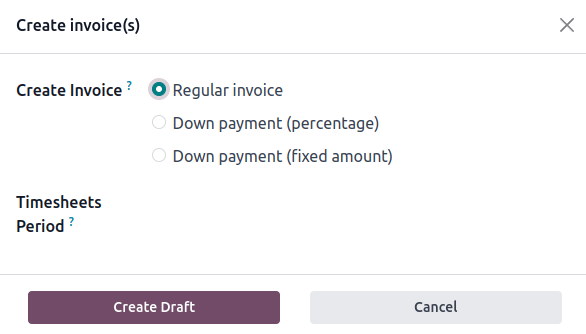
The image markup allows inserting images in a document.
|
.. image:: rst_guidelines/create-invoice.png
   :alt: Create an invoice.
|
Javaslat
Images should generally be aligned to the left, which is the default behavior. Use the
alignparameter to change the alignment, e.g.,:align: center.Use the
altparameter to add ALT tags, e.g.,:alt: Activating the developer mode in the Settings app.Use the
scaleparameter to scale the image, e.g.,:scale: 75%.
Lásd még
Alert blocks (admonitions)
See also
.. seealso::
   - :doc:`Accounting documentation <../../../applications/finance/accounting>`
   - :doc:`../../../applications/sales/sales/invoicing/proforma`
   - `Google documentation on setting up Analytics for a website <https://support.google.com/analytics/answer/1008015?hl=en/>`_
|
Note
Megjegyzés Use this alert block to draw the reader’s attention and highlight important additional information. |
.. note::
   Use this alert block to draw the reader's attention and highlight important additional information.
|
Tip
Javaslat Use this alert block to inform the reader about a useful trick that requires an action. |
.. tip::
   Use this alert block to inform the reader about a useful trick that requires an action.
|
Example
Example Use this alert block to show an example. |
.. example::
   Use this alert block to show an example.
|
Exercise
Exercise Use this alert block to suggest an exercise to the reader. |
.. exercise::
   Use this alert block to suggest an exercise to the reader.
|
Important
Fontos Use this alert block to notify the reader about important information. |
.. important::
   Use this alert block to notify the reader about important information.
|
Warning
Figyelem Use this alert block to require the reader to proceed with caution with what is described in the warning. |
.. warning::
   Use this alert block to require the reader to proceed with caution with what is described in the warning.
|
Danger
Veszély Use this alert block to bring the reader’s attention to a serious threat. |
.. danger::
   Use this alert block to bring the reader's attention to a serious threat.
|
Custom
Title Customize this alert block with a Title of your choice. |
.. admonition:: Title

   Customize this alert block with a **Title** of your choice.
|
Tables
List tables
List tables use two-level bulleted lists to convert data into a table. The first level represents the rows and the second level represents the columns.
|
|||||||||
.. list-table::
   :header-rows: 1
   :stub-columns: 1

   * - Name
     - Country
     - Favorite colour
   * - Raúl
     - Montenegro
     - Purple
   * - Mélanie
     - France
     - Turquoise
|
Grid tables
Grid tables represent the rendered table and are more visual to work with.
|
|||||||||||
+-----------------------+--------------+---------------+
|                       | Shirts       | T-shirts      |
+=======================+==============+===============+
| **Available colours** | Purple       | Green         |
|                       +--------------+---------------+
|                       | Turquoise    | Orange        |
+-----------------------+--------------+---------------+
| **Sleeves length**    | Long sleeves | Short sleeves |
+-----------------------+--------------+---------------+
|
Javaslat
Use
=instead of-to define header rows.Remove
-and|separators to merge cells.Make use of this convenient table generator to build tables. Then, copy-paste the generated formatting into your document.
Code blocks
Use the code-block directive to show example code. Specify the language (e.g., python, xml, etc.)
to format the code according to the language’s syntax rules.
def main():
    print("Hello world!")
|
.. code-block:: python

   def main():
       print("Hello world!")
|
Spoilers
42 |
.. spoiler:: Answer to the Ultimate Question of Life, the Universe, and Everything

   **42**
|
Content tabs
Figyelem
The tabs markup may not work well in some situations. In particular:
The tabs» headers cannot be translated.
A tab cannot contain headings.
An alert block cannot contain tabs.
A tab cannot contain custom anchors.
Basic tabs
Basic tabs are useful to split the content into multiple options. The tabs markup is used to
define sequence of tabs. Each tab is then defined with the tab markup followed by a label.
Content dedicated to Odoo Online users. Alternative for Odoo.sh users. Third version for On-premise users. |
.. tabs::

   .. tab:: Odoo Online

      Content dedicated to Odoo Online users.

   .. tab:: Odoo.sh

      Alternative for Odoo.sh users.

   .. tab:: On-premise

      Third version for On-premise users.
|
Nested tabs
Tabs can be nested inside one another.
The closest star to us. The second closest star to us. The North Star. Orbits the Earth. Orbits Jupiter. |
.. tabs::

   .. tab:: Stars

      .. tabs::

         .. tab:: The Sun

            The closest star to us.

         .. tab:: Proxima Centauri

            The second closest star to us.

         .. tab:: Polaris

            The North Star.

   .. tab:: Moons

      .. tabs::

         .. tab:: The Moon

            Orbits the Earth.

         .. tab:: Titan

            Orbits Jupiter.
|
Group tabs
Group tabs are special tabs that synchronize based on a group label. The last selected group is
remembered and automatically selected when the user returns to the page or visits another page with
the tabs group. The group-tab markup is used to define group tabs.
C++ Python Java int main(const int argc, const char **argv) {
return 0;
}
def main():
return
class Main {
public static void main(String[] args) {}
}
|
.. tabs::
.. group-tab:: C++
C++
.. group-tab:: Python
Python
.. group-tab:: Java
Java
.. tabs::
.. group-tab:: C++
.. code-block:: c++
int main(const int argc, const char **argv) {
    return 0;
}
.. group-tab:: Python
.. code-block:: python
def main():
    return
.. group-tab:: Java
.. code-block:: java
class Main {
    public static void main(String[] args) {}
}
|
Code tabs
Use the code-tab markup to create code tabs, which are essentially group tabs that treat the tabs» content as a code block. Specify the language to format the code according to the language’s
syntax rules. If a label is set, it is used for grouping tabs instead of the language name.
#include <iostream>

int main() {
    std::cout << "Hello World";
    return 0;
}
print("Hello World")
console.log("Hello World");
|
.. tabs::

   .. code-tab:: c++ Hello C++

      #include <iostream>

      int main() {
          std::cout << "Hello World";
          return 0;
      }

   .. code-tab:: python Hello Python

      print("Hello World")

   .. code-tab:: javascript Hello JavaScript

      console.log("Hello World");
|
Cards
.. cards::

   .. card:: Documentation
      :target: ../documentation
      :tag: Step-by-step guide
      :large:

      Use this guide to acquire the tools and knowledge you need to write documentation.

   .. card:: Content guidelines
      :target: content_guidelines

      List of guidelines, tips, and tricks to help you create clear and effective content.

   .. card:: RST guidelines
      :target: rst_guidelines

      List of technical guidelines to observe when writing with reStructuredText.
|
Sub-pages
The toctree directive is used to organize documentation into sections with sub-pages.
It adds a table of contents at the current location (i.e., the parent page), built from the files
listed in the directive. All RST files must be included in a TOC tree, unless the orphan
metadata markup is used.
Javaslat
Use relative links to list the files to be displayed as sub-pages.
Use the
titlesonlyparameter to only show the sub-pages» main headings when a parent page’s content and TOC tree are displayed.
Example
TOC tree in the documentation’s main TOC:
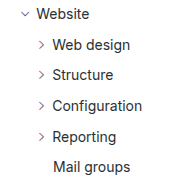
toctreedirective inwebsite.rst(i.e., the parent page):.. toctree:: :titlesonly: website/web_design website/pages website/configuration website/reporting website/mail_groups
Document metadata
Sphinx supports document-wide
metadata markups that specify a behavior for the entire page. They must be placed between colons
(:) at the top of the source file.
Metadata |
Purpose |
|
Make the content of a RST file that contains a toc tree visible and accessible from the documentation’s main table of contents. |
|
Display the page’s table of contents
when using the |
|
Hide the „On this page” sidebar and use full page width for the content. |
|
Exclude the document from search results. |
|
Suppress the need to include the document in a TOC tree. |
|
Show a dynamic side column that can be used to display interactive
tutorials or code excerpts.
For example, see
Könyvelési cheat sheet.
|
|
Link CSS files (comma-separated) to the file. |
|
Link JS files (comma-separated) to the document. |
|
Assign the specified classes to the |
Formatting tips
Break the line but not the paragraph
A first long line that you break in two
-> here <- is rendered as a single line.
A second line that follows a line break.
|
| A first long line that you break in two
  -> here <- is rendered as a single line.
| A second line that follows a line break.
|
Escape markup symbols
Markup symbols escaped with backslashes (\) are rendered normally. For instance, this
\*\*line of text\*\* with \*markup\* symbols is rendered as “this **line of text** with
*markup* symbols”.
When it comes to backticks (`), which are used in many cases such as external hyperlinks, using backslashes for escaping is no longer
an option because the outer backticks interpret enclosed backslashes and thus prevent them from
escaping inner backticks. For instance, `\`this formatting\`` produces an
[UNKNOWN NODE title_reference] error. Instead, ```this formatting``` should be used to
produce the following result: `this formatting`.